How an ASP.NET Core app works: the big picture
One picture of everything that happens when someone opens a page in an ASP.NET Core MVC app: startup, Kestrel, the middleware pipeline, the controller, services, EF Core, SQL Server, the Razor view and the response. Keep it open while you work through the rest of the course.
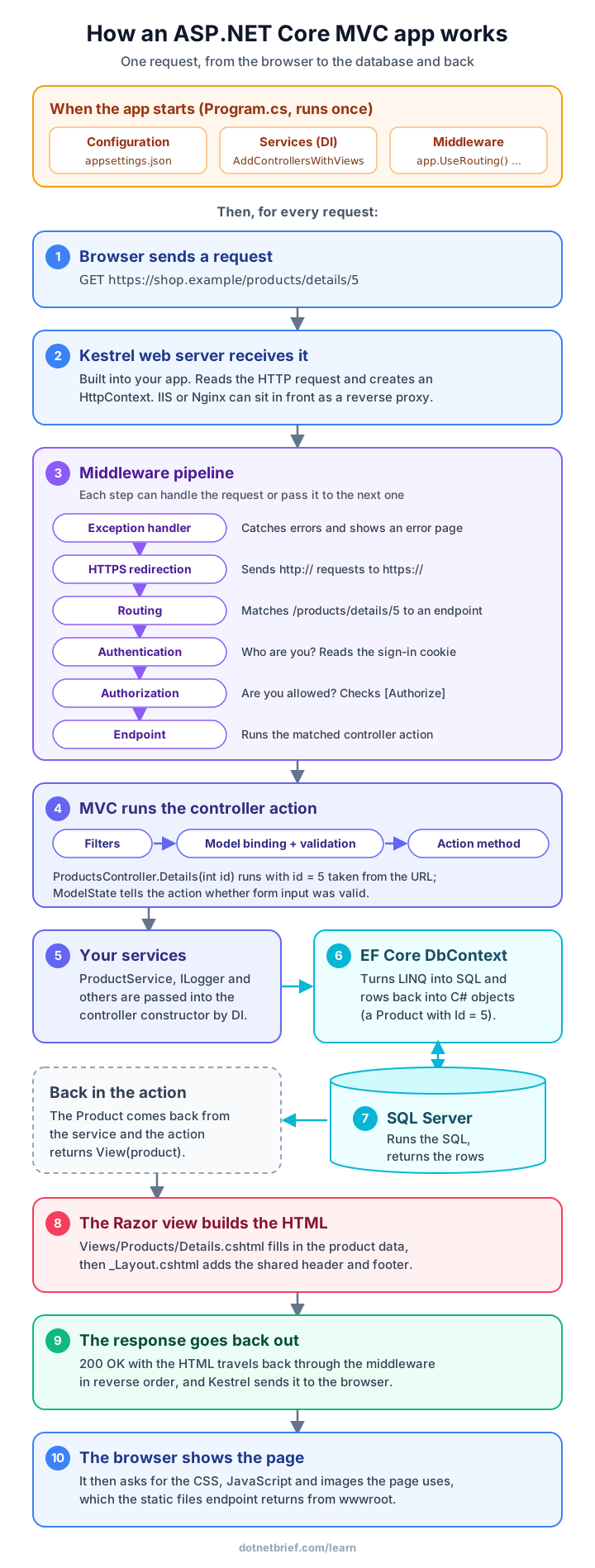
Read the picture from top to bottom
Every number in the picture is one stage. The rest of this course has a lesson for each of them.
- Startup: Program.cs runs once. It reads configuration, registers services in the dependency injection (DI) container and builds the middleware pipeline.
- 1 and 2: the browser sends a request, and Kestrel, the web server built into your app, turns it into an HttpContext object.
- 3: the request passes through the middleware pipeline in order. Routing decides which controller action should handle it, and authentication and authorization check who the user is.
- 4: MVC runs filters, binds values from the URL and form to the action's parameters (model binding), validates them, and calls the action method.
- 5 to 7: the action uses services that DI passed into the controller. A service uses the EF Core DbContext, which sends SQL to SQL Server and turns the rows into C# objects.
- 8: the action returns View(model), and the Razor view and layout produce HTML.
- 9 and 10: the response goes back through the middleware to Kestrel and the browser, which then loads the page's CSS, JavaScript and images.
The same flow in Program.cs
This is the Program.cs of a new MVC project in .NET 10, plus EF Core and one service. The comments match the numbers in the picture.
var builder = WebApplication.CreateBuilder(args);   // Startup: configuration and logging

// Startup: register services in the DI container
builder.Services.AddControllersWithViews();
builder.Services.AddDbContext<ShopContext>(o =>
    o.UseSqlServer(builder.Configuration.GetConnectionString("Shop")));
builder.Services.AddScoped<ProductService>();

var app = builder.Build();                           // 2: Kestrel is configured here

// 3: the middleware pipeline, in this order
if (!app.Environment.IsDevelopment())
{
    app.UseExceptionHandler("/Home/Error");
    app.UseHsts();
}
app.UseHttpsRedirection();
app.UseRouting();
app.UseAuthentication();
app.UseAuthorization();

app.MapStaticAssets();                               // 10: CSS, JavaScript, images
app.MapControllerRoute(                              // 4: endpoint for MVC actions
        name: "default",
        pattern: "{controller=Home}/{action=Index}/{id?}")
    .WithStaticAssets();

app.Run();                                           // start listening for requests
Your code in steps 4 to 8
Most of your daily work happens in these few lines: a controller action, a service and a view.
public class ProductService(ShopContext db)
{
    // 6 and 7: EF Core turns this into a SELECT and returns a Product
    public Task<Product?> FindAsync(int id) =>
        db.Products.AsNoTracking().FirstOrDefaultAsync(p => p.Id == id);
}

public class ProductsController(ProductService products) : Controller   // 5: DI
{
    // 4: GET /products/details/5 -> routing picks this action, model binding sets id = 5
    public async Task<IActionResult> Details(int id)
    {
        var product = await products.FindAsync(id);
        if (product is null) return NotFound();
        return View(product);                // 8: Views/Products/Details.cshtml
    }
}
Once at startup, or on every request?
Knowing which parts run once and which run for every request explains many bugs and performance problems.
- Once at startup: reading appsettings.json, registering services, building the pipeline and creating singleton services.
- On every request: the whole middleware pipeline, routing, a new controller instance, model binding, scoped services such as the DbContext, the database query and the view.
- Because a new DbContext and controller are created for every request, it is safe to keep request data in them, and wrong to keep it in singletons.
Where to go next
The next module, Request life cycle, zooms into steps 2 to 4: middleware, routing and filters. Controllers and views covers steps 4 and 8, App essentials covers dependency injection and configuration, and the separate SQL and Entity Framework Core courses cover steps 6 and 7 in depth.
Interview question
Explain what happens when a browser requests a page from an ASP.NET Core MVC app.
Kestrel receives the HTTP request and creates an HttpContext. It flows through the middleware pipeline built in Program.cs, such as exception handling, HTTPS redirection, routing, authentication and authorization. Routing selects a controller action; MVC runs filters, model binding and validation, then the action. The action uses services injected by DI, often an EF Core DbContext that queries the database, and returns a result such as View(model). The Razor view renders HTML, and the response travels back through the middleware to Kestrel and the browser.
Want the full details? Read the official Microsoft documentation for this topic.